Stop scrolling the group chat. Tee Share puts your golf tee times in one link.

Saturday, 7:00 a.m., Glen Abbey.
The WhatsApp group already has forty messages: who’s in, who’s bringing a car, green fee AA, still need one, ignore the last message…
Organizing a round shouldn’t be harder than playing it.
Tee Share is a tee-time board built for WhatsApp golf groups. Each group gets a private link. Course, time, roster, and waitlist live there. Friends tap the link and join — no account, no password.
Try it: https://teeshare.nextaisite.ca
This is not a public “find a random foursome” app
Tee Share is isolated by group.
- Only people with your group link can see that group’s tee times
- It is not a marketplace that lists your round to every golfer on the internet
- If a link leaks, an admin can reset it instantly. The old URL dies; the tee times stay
If you already have a WhatsApp golf group and you’re tired of matching names in the chat, this is for you.
For players: about 30 seconds
After an admin drops the link in the group:
- Open it and see that group’s tee times
- Use Open / Joined to find rounds that still need players
- Join with a name. Contact and a short note are optional (phone, running late, bringing a car)
- If it’s full, join the waitlist (up to 4). Spots fill in order when someone leaves
- You can also post a round: take a seat, or organize without playing. Add up to 3 companions
On a phone, a green Join button stays at the bottom. After you join it turns into Leave, with a confirm step so you don’t tap it by accident.
The same browser remembers your spot. You don’t re-enter your name every time.

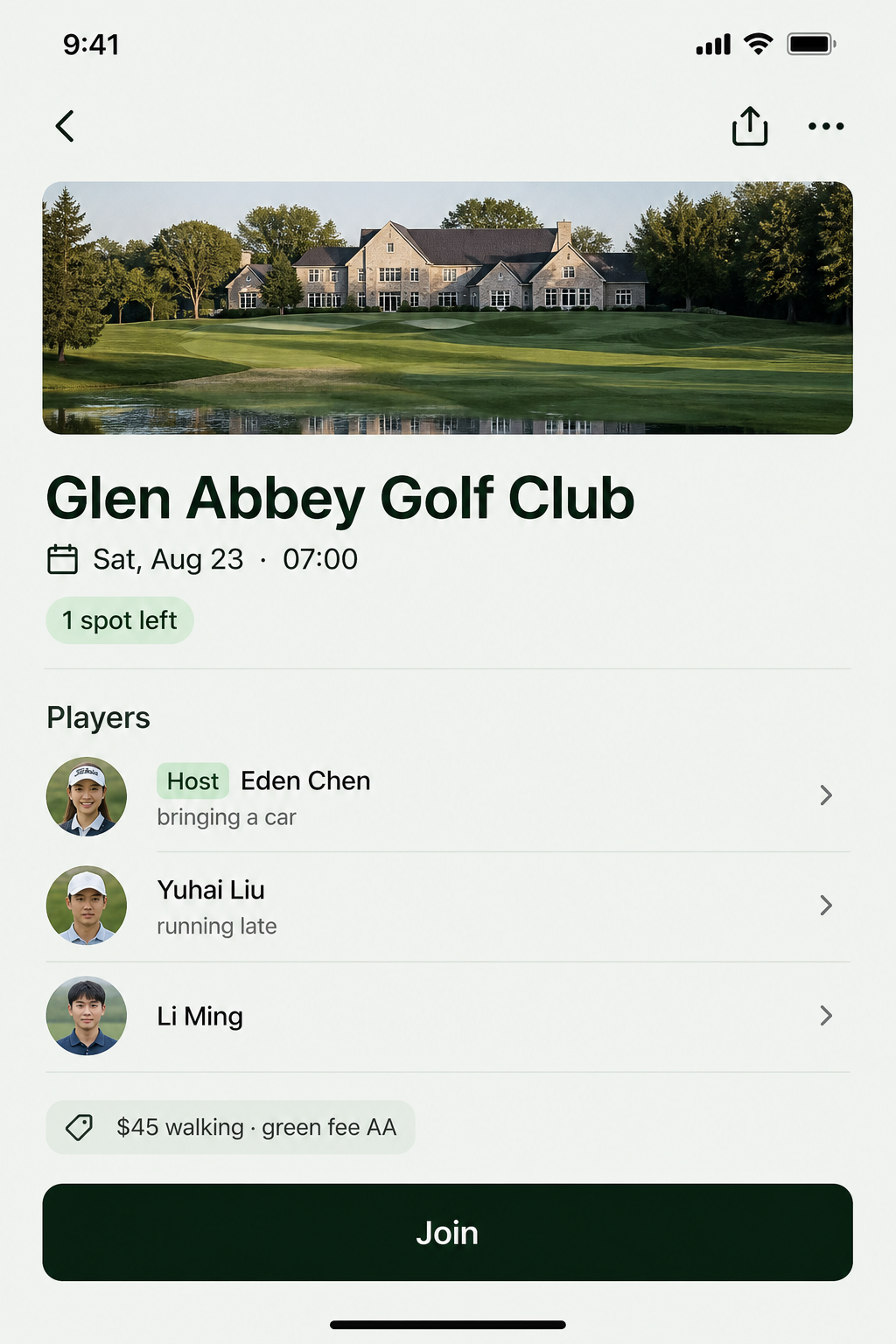
The annoying parts of group-chat golf, handled
How many spots are left?
Open rounds sort first. No digging through chat history.
Share a poster, not another wall of text
From the detail page you can generate a poster, save the image, and send it to the WhatsApp group. You can also copy the link or a short message. Scan to join.
Don’t forget the tee time
Players who joined — and the host — can add the round to their phone calendar. If WhatsApp’s in-app browser blocks it, copy the event text first, or open the page in Safari / Chrome and then add it.
Keep a score
Anyone on the roster can enter a total for the round.
Hosts edit. Others don’t.
Course, time, capacity, and notes are host-only. Editing does not wipe the roster. Admins can delete a round (email confirm) but cannot edit someone else’s posting.

For group admins: four steps
- Open https://teeshare.nextaisite.ca and sign in
- Enter your email and use the code or magic link (no password)
- Create a group — e.g. “Friday golf”
- Copy the private link and paste it into WhatsApp
That’s it. The first successful verify creates the account.
A group can have up to 5 admins. Invite them with a link; they sign in with email too. Each email can admin at most 10 groups. The last admin cannot leave, so the space doesn’t become ownerless.
Sent the link to the wrong people? Reset it on the admin page and share the new one.
Full walkthrough: https://teeshare.nextaisite.ca/guide
One line: the round is organized in the group; the roster shouldn’t be buried in the chat.
Built by NEXT INC
Tee Share is a product from NEXT INC — a private group tool, not a public tee-time marketplace. It is live at teeshare.nextaisite.ca.
Chinese UI is the default (开球共享). English is one tap away.
Book the next round
Tee Share — WhatsApp group tee times
https://teeshare.nextaisite.ca
- Admins: sign in → create a group → drop the link in WhatsApp
- Players: open the link and join
See you on the first tee. Don’t let “still need one” run until ten minutes before the time.